The Browser Is Breaking Your DLP: How Data Slips Past Modern Controls

Phong Xuan
*
The Modern DLP Blind Spot
Preventing sensitive data loss has historically been treated as an endpoint or network problem. Deploy an agent, inspect files, monitor traffic, and you have coverage—or so you think.
Our recent analysis shows that , exposing a significant gap in how organizations monitor and control the flow of data moving throughout their digital ecosystem.
Security teams think they have significant DLP coverage, but they’re actually lacking visibility and control into where data is often moving today: in the browser.
Why DLP is Failing, Browser Work is Hidden
Enterprise workflows have shifted from software on the endpoint to browser-based applications. Today, employees commonly use Google Workspace, Microsoft 365, or Salesforce; developers utilize GitHub, Jira, and internal web apps; and many departments now embrace AI tools like ChatGPT and copilots.
Instead of downloading, modifying, and re-uploading files to sanctioned web apps, users are interacting with data directly in the browser by copying data from or between applications, uploading files to various tools, and inputting data into web forms and AI prompts.
Compounding the risks of these activities is the simple fact that employees often use personal accounts and unsanctioned instances without restriction.
In other words, the traditional DLP controls your team relies on aren’t instrumented where much of the modern activity is happening.
See how Keep Aware protects sensitive data directly in the browser—without slowing your team down. Get real-time visibility, smart alerts, and seamless control over data movement across AI tools and other apps.
Book a demo to see browser-native data loss prevention in action.
How Sensitive Data Actually Leaves the Browser
To understand why existing DLP implementations are falling short, it’s important to look at how data leakage actually occurs in modern environments. Within browser sessions, users can type, paste, and upload data to web pages and applications—both sanctioned and not.
Copy and Paste: Users routinely copy sensitive data—customer records, credentials, source code—from internal systems and paste it into personal email, SaaS apps, and AI tools. The clipboard has become a high-risk channel that most traditional DLP solutions cannot inspect or control with context
Form Inputs and AI Prompts: Sensitive data doesn’t always move as a file or pasted from clipboard contents. It’s often typed directly into web forms, SaaS applications, or even AI prompts.
Operating solely within the browser session, endpoint and network DLP controls never trigger.
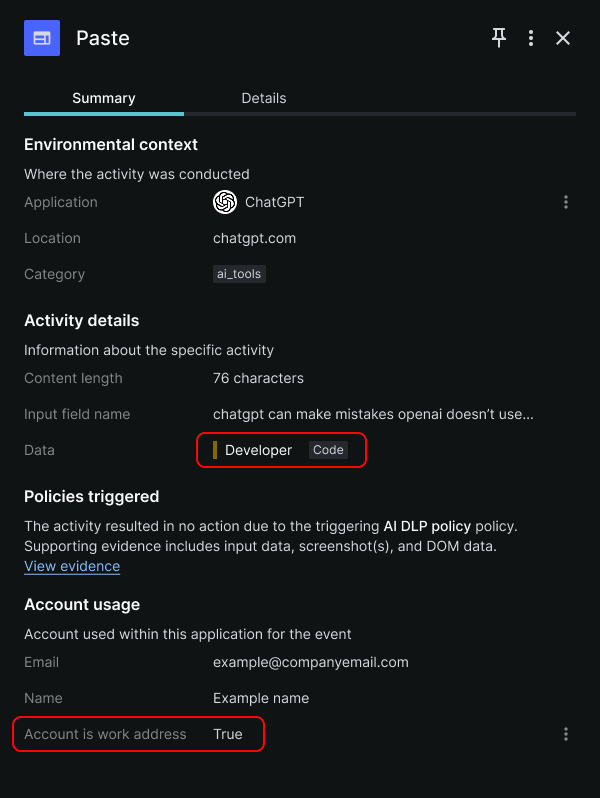 A Paste event, as shown in Keep Aware’s Console,
indicates that a user pasted code in a ChatGPT account tied to their organization.
A Paste event, as shown in Keep Aware’s Console,
indicates that a user pasted code in a ChatGPT account tied to their organization.
File Uploads to SaaS and AI Tools: File uploads remain a major data loss vector, and one that appears like normal activity on the surface. Employees upload source code, financial data, and customer records. But as noted earlier, up to half of these uploads may be going to unsanctioned destinations, including personal accounts or unapproved tools.
Shadow Accounts and Instances: Even within approved domains and applications, risk and visibility gaps persist. A user may upload PHI records to an AI prompt using a personal account, store sensitive files to a personal Google Drive, or other SaaS tool, instead of a corporate one.
From a traditional DLP perspective, this activity often looks indistinguishable from normal usage on that domain.
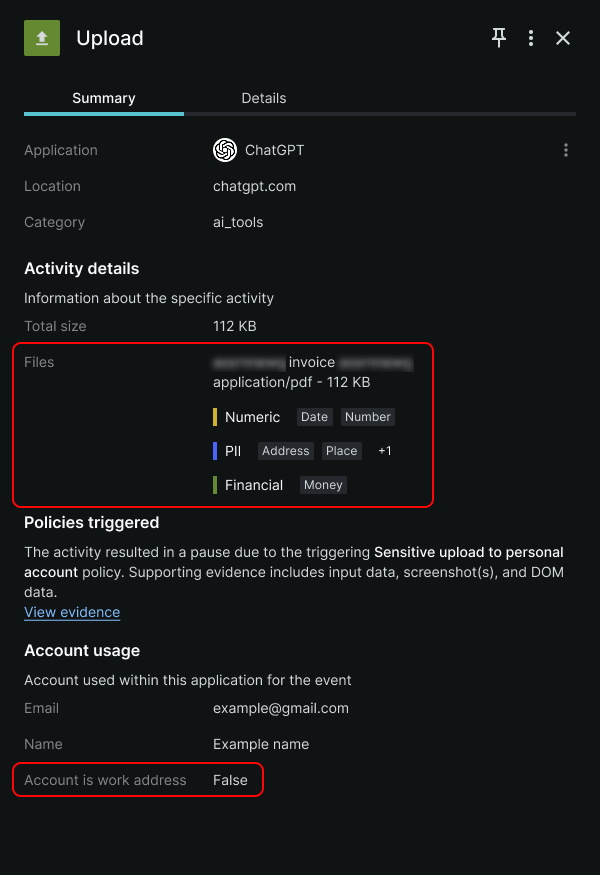 An Upload event, as shown in Keep Aware’s Console,
indicates that an employee uploaded a potentially sensitive document to their personal ChatGPT account.
An Upload event, as shown in Keep Aware’s Console,
indicates that an employee uploaded a potentially sensitive document to their personal ChatGPT account.
Data loss in the browser often looks like normal user behavior, but in the wrong context.
A Real-World Example: Sensitive Data Exposure in the Browser
Consider a common workflow: a developer accesses the company’s private GitHub repository, copies a block of proprietary source code, then opens a personal ChatGPT session to troubleshoot an issue. When they paste that code into the AI prompt, sensitive data has effectively left the organization.
No file was downloaded nor uploaded. The company allows traffic to ChatGPT, so no network-based protection was triggered. No traditional DLP control flagged the paste action. This entire sequence of events appears as benign user and browser activity despite introducing real risk to the company’s sensitive data.
With browser-native DLP, this interaction becomes fully visible and enforceable. A browser-based DLP solution, such as , detects the sensitive data, understands it originated from a sanctioned app, and recognizes it’s being sent to an unsanctioned AI tool tied to a personal account.
A policy can then block the user’s action or warn the security team of the action, while capturing a full timeline of events—turning what would otherwise be invisible into a clear, actionable security signal.
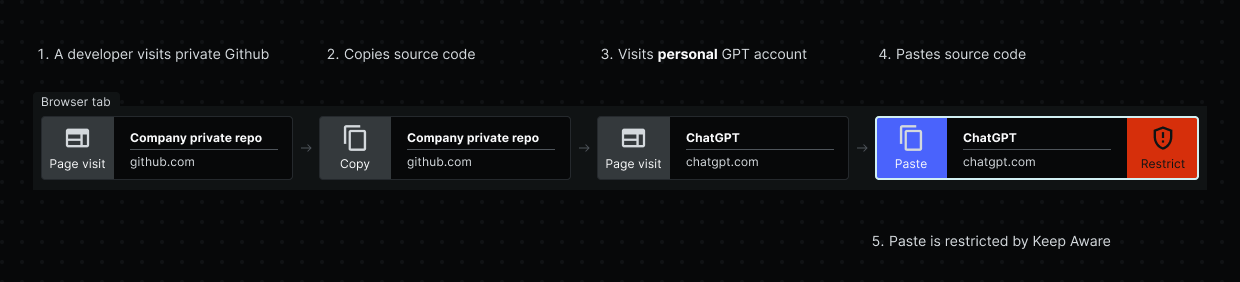 Timeline of a developer copying and pasting proprietary code from a private repository into a personal ChatGPT account.
The Traditional DLP Gap in the Browser
Traditional DLP solutions were designed for a different risk model, one that focuses on preventing data leakage from endpoints, networks, and even cloud environments.
Endpoint DLP lacks visibility into the data being copied and pasted within the browser, the web application itself, and the type of user account used—all crucial contextual data points needed to effectively govern sensitive data.
Similarly, Network DLP lacks the same critical context—even when proxy solutions enable inspection of otherwise encrypted browser traffic—while remote and distributed workforces can add to the underlying visibility problem.
Cloud DLP is like a combination of endpoint and network DLP solutions, but provides visibility and control over a specific SaaS instance or cloud environment, one that is already sanctioned and governed by IT security.
Traditional DLP looks at files at rest and data on the move, but it wasn’t designed to inspect, let alone control, the user activities and session context within the most widely used application in today’s workforce.
Browser-Native DLP: Closing the Gap in Modern Data Protection
operates directly within users’ browsing sessions, uniquely positioned with the visibility that enables organizations to:
Inspect data in real time (copy and paste activities, form and prompt inputs, file uploads)
Understand context (which application is in use, whether the account or instance is corporate or personal, what type of data is being handled)
Enforce inline controls (block or warn on risky actions, apply conditional policies based on context, allow safe workflows without disrupting productivity)
This approach doesn't replace your organization's existing DLP stack. It complements it, filling a glaring visibility gap that network-level and endpoint tools simply weren't built to address.
Keep Aware brings this capability directly into the browser itself. Rather than relying on file movement signals or network traffic, it operates at the point of user interaction, analyzing data in real time across typed inputs, copy/paste activities, and uploads, with the context of the application, instance, and account involved. Inline enforcement policies empower security teams to block sensitive actions, alert users before risky behavior, allow approved workflows with safeguards, reinforce Acceptable Use Policies at the moment of action, and provide forensic details through a robust evidence collection capability.
If you're evaluating where browser-native DLP fits in your security strategy, to see how Keep Aware works in a real enterprise environment.
Sponsored and written by .*